A Great Indian Festival or Big Billion Days discount can make a 65-inch Mini-LED TV feel like an automatic upgrade. It is not. A screen that fights your room will annoy you long after the sale banner disappears.
Mini-LED is a backlight design. It can be a useful display technology, but it does not measure your wall, move your window or improve the video you feed it.
The screen size is not the TV size
The number in the product name measures the screen diagonally. Your cabinet has to deal with the whole object.
Samsung's TV buying guide says viewing distance and angle matter when setting up a TV. The same guide says a big-screen TV's physical dimensions, stand and bezel all matter, and recommends comparing them with your furniture.
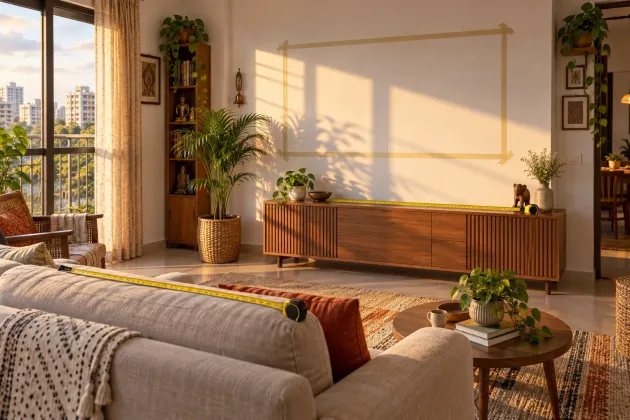
Open the model's official dimensions page. Mark the full width and height on the wall with masking tape. Then mark the stand feet on your cabinet. Leave practical room for plugs, a soundbar and cleaning. Do not stop at the glowing rectangle. The cabinet still has to hold the bezel and stand.
Measure from your eyes, not the sofa edge
Sit where you normally watch. Do not shift forward into your buying-a-TV posture. Measure from your eyes to the wall or to the point where the screen will sit.
Use the maker's viewing-distance guidance as a starting point, then look at your taped outline. Can you take in the picture without scanning from corner to corner? Can the person on the side seat see comfortably? If the room only works after moving the sofa into a doorway, the TV is too large for the room.
Run the window test
Turn your current screen off during the hours when you usually watch. The dark surface will reveal reflected windows, balcony doors and lamps. Repeat the check from every regular seat.
Samsung says glare happens when light from windows or lamps reflects off the screen and makes the picture harder to see. A bright showroom cannot tell you whether your own window will sit in the middle of a dark scene.
If a strong reflection lands on the screen, change the layout or plan a curtain before buying. When neither is possible, compare model-specific reflection handling instead of trusting the word “bright”.
Your worst video is the real audition
A polished demo hides the problem. Take the ordinary clip you complain about: a compressed stream, an old family video or a soft television channel. That is the clip a larger screen must survive.
Samsung defines upscaling as technology that increases lower-quality content's resolution and optimises it for the display. It also says brands handle upscaling differently. In plain English, a large sharp panel cannot create detail that was never in the source, and processing quality matters.
Ask a shop to play your clip on the exact model with its normal picture mode. Watch faces, dark backgrounds and moving text. If the image looks rough there, more screen will make the roughness harder to ignore.
Mini-LED is not a room-fit certificate
Samsung describes Mini LED as backlight technology that uses smaller lights than standard LED. That tells you how the display makes light. It does not tell you the stand width, reflection control, side-seat view or processing quality of a particular model.
If the display labels are doing your head in, our Micro RGB versus OLED guide explains how the technologies differ.
Buy the exact model only after checking those model-specific points. Skip it if your room needs constant curtain duty, your cabinet barely holds it, or most of your viewing is low-quality video that the processor handles badly. A slightly smaller television that fits your daily life is the better bargain.
What to actually do
- Tape the full TV outline on the wall and the stand footprint on the cabinet.
- Measure from your eyes in your normal seat to the future screen plane.
- Check the blank screen for window and lamp reflections at your usual viewing time.
- Play your roughest everyday clip on the exact model before paying.
- Walk away if the room needs to be redesigned around the discount.