Lennovo Logitech MX Master 4 Wireless Mouse (Model: MR0118)
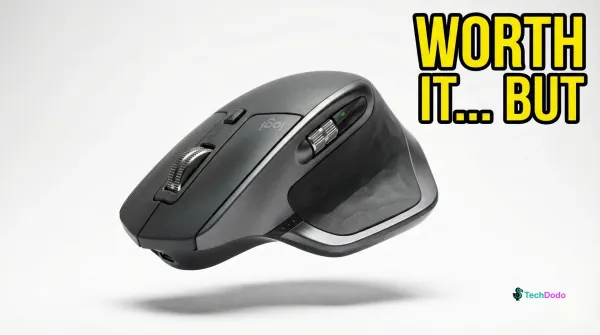
Price (MRP): ₹15,995.00
Logitech MX Master 4: Is the ₹15,995 Upgrade Worth It in India?
Ratings
Overall
Design
Performance
Features
Value
Pros & Cons
Pros:
• Superior Build Materials: Logitech ditched the sticky rubber coating that plagued the 3S for textured high-quality plastics and silicone grips — this mouse won't turn into a grimy mess after a year
• MagSpeed Scroll Wheel Excellence: Scrolls through 1,000 lines per second with pixel-perfect precision; multiple reviewers confirm horizontal scrolling is significantly faster than the 3S
• USB-C Dongle Finally Included: After years of USB-A dongles, Logitech ships a USB-C Logi Bolt receiver with 2x improved connectivity strength
• 70-Day Battery Life: Real-world tests confirm weeks of use without charging, and 1-minute USB-C quick charge delivers 3 hours of use
• Repairability & Sustainability: User-replaceable battery, 48% recycled plastic, low-carbon aluminum thumbwheel, visible bottom screws for easy disassembly.
Cons:
• No Onboard Memory: Requires Logi Options+ software on every computer for customization; corporate environments blocking third-party software are out of luck
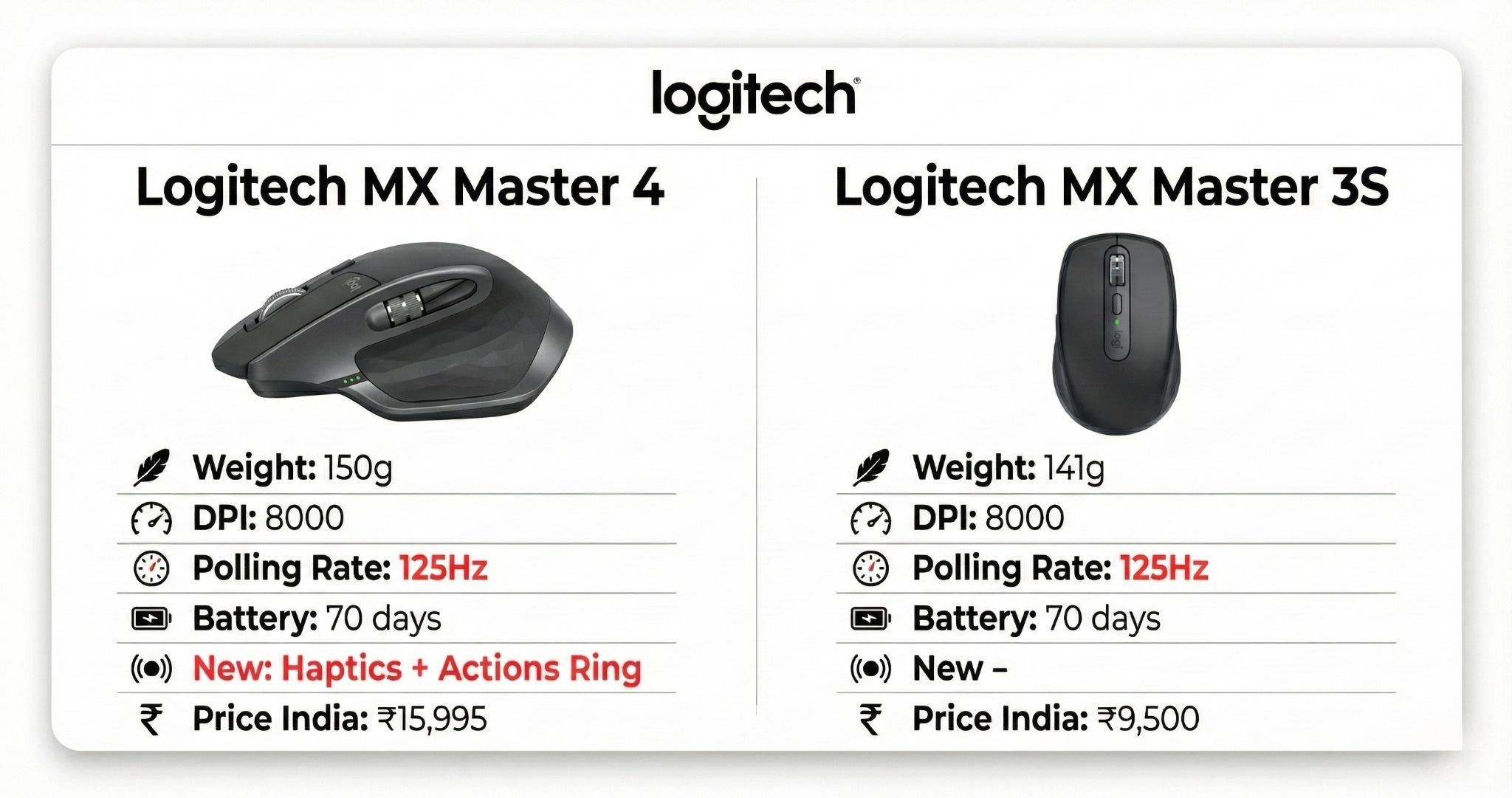
• Heavier Than Predecessor: 150g vs 141g on the 3S — multiple users report the mouse slips more easily due to new materials combined with added weight
• Wake-From-Idle Issues: Business Standard's review and Reddit users report cursor lag and inverted scroll direction for the first few seconds after waking — a regression from the 3S
• No USB-C Cable Included: At ₹15,995, charging cable is sold separately
• Actions Ring Novelty Wears Off: PC Gamer and Neowin reviewers found themselves returning to keyboard shortcuts within days; requires significant setup investment.
⚡ Verdict
The Logitech MX Master 4 is the most refined productivity mouse you can buy in India, with genuine improvements in haptics, materials, and connectivity. However, the unchanged 125Hz polling rate feels inexcusable at this price point in 2025. Buy it if you're a creative professional who values workflow features over raw responsiveness, or you're upgrading from an MX Master 2 or older. Skip it if you already own an MX Master 3S — the haptics are nice but don't justify ₹15,995 when your 3S works fine.
Scroll for specs, ratings, and where to buy.
Detailed Review
The spec sheet says "first MX mouse with haptics." What it doesn't say is that Logitech kept the same 125Hz polling rate they've used since the first MX Master in 2015. Ten years. Same refresh rate. Let that sink in before you spend ₹15,995.
But here's the thing — the MX Master 4 is still probably the best productivity mouse you can buy. And that frustrating contradiction defines everything about this device.
Quick Take
What it is: Logitech's flagship wireless productivity mouse with customizable haptic feedback, Actions Ring workflow shortcuts, 8,000 DPI Darkfield sensor, MagSpeed scrolling, and 70-day battery life
Who it's for: Creative professionals using Adobe apps, developers scrolling through endless code, spreadsheet warriors, and multi-device power users who spend 8+ hours daily with a mouse
Reality check: If you already have an MX Master 3S and don't desperately need haptics, save your money. The upgrade is evolutionary, not revolutionary.
Design & Build: The Coating Problem Is Finally Fixed
Pick up an MX Master 4 and the first thing you'll notice is what's missing — that soft-touch rubber coating that turned every MX Master 3 into a fingerprint magnet within months. Logitech switched to textured high-quality plastic on the main body, with silicone only where your thumb and pinkie actually rest.
Multiple long-term reviewers from Neowin and The Gadgeteer confirm the 3S developed visible wear and shine on click buttons within 7-12 months. The MX Master 4's redesigned surface should age far better — though only time will tell.
The mouse is heavier at 150g versus 141g on the 3S. Some reviewers from Reddit's r/MouseReview and user forums describe the new shape as "slippery" and harder to pick up. This is subjective — PCWorld and BGR found it more premium in hand — but if you palm-grip aggressively, try before you buy.
The USB-C dongle finally replaces the USB-A receiver, and it's smaller. There's no storage compartment inside the mouse for the receiver, which feels like an oversight at this price.
Performance: Great Sensor, Embarrassing Polling Rate
The 8,000 DPI Darkfield sensor tracks on any surface, including glass, with the precision Logitech is known for. RTings.com and PCWorld confirm zero tracking issues across wood, fabric, glass, and even ceramic surfaces.
Here's where we have to talk about the elephant in the room. The MX Master 4 uses a 125Hz polling rate. In 2025. For ₹15,995.
For context: your cursor position updates 125 times per second. Budget gaming mice at ₹2,000 offer 1000Hz — eight times faster. Multiple reviewers from Neowin, PC Gamer, and user forums confirm visible cursor lag on high refresh rate monitors, especially during fast movements or window dragging on OLED displays.
Logitech claims this is a "productivity mouse, not gaming mouse." Fair. But productivity users also notice smoothness. If you've never used a high polling rate mouse, you won't miss it. If you have, you'll feel it every time you drag a window.
Haptics & Actions Ring: The Headline Features
The customizable haptic feedback is genuinely excellent. 9to5Mac's review describes it as "Apple Watch-quality" tactile response. You feel subtle vibrations when scrolling, hovering over Actions Ring shortcuts, connecting to a device, or when battery runs low.
The haptics work best with supported apps through Logi Options+ plugins: Adobe Photoshop, Lightroom, Premiere Pro, Zoom, and DaVinci Resolve. In other applications, haptic usage is limited to the Actions Ring and gestures.
Actions Ring is Logitech's answer to the Touch Bar — a radial menu that appears around your cursor with customizable shortcuts. Press the dedicated button (where the old gesture button was), and you get app-specific tools without diving into menus.
The catch: Console Creatures and Neowin reviewers found the novelty wore off within days. If you've developed muscle memory for keyboard shortcuts over years, a circular menu won't replace that. But for users new to workflow optimization, it's a genuine productivity boost.
Battery & Connectivity: No Complaints Here
The 70-day battery life is real. Multiple reviewers report 6-8 weeks of heavy use before needing a charge. The 1-minute quick charge for 3 hours of use is clutch when you forget to charge overnight.
Connectivity is improved with a new high-performance chip and optimized antenna. Logitech claims 2x stronger wireless signal versus the 3S. BGR's review notes no connection drops during weeks of testing across multiple devices. The mouse pairs with up to three devices and switches via button or Actions Ring.
However, Business Standard's detailed review found brief wake-from-idle issues: cursor lag and inverted scroll direction for the first few seconds after the mouse wakes. This is a regression from the 3S.
Software: Powerful But Required
Logi Options+ is required for any advanced customization. Without it, you have a basic mouse. With it, you get app-specific profiles, Smart Actions automation, gesture customization, haptic intensity controls, and Actions Ring configuration.
The software runs lightweight in the background according to Neowin's testing. But here's the critical issue: no onboard memory. Your customizations live in the software, not the mouse. If your workplace blocks third-party software installation, the MX Master 4 becomes a very expensive basic mouse.
Marketing Claims vs Reality
Claim: "Up to 33% time savings with Actions Ring shortcuts" Reality: Logitech's internal study measured specific desktop actions. Real-world benefit depends entirely on how much time you invest in setup. Multiple reviewers found keyboard shortcuts faster after the initial novelty period. Verdict: ⚠️ Partial
Claim: "2x more powerful connectivity" Reality: Professional reviews confirm improved stability, but wake-from-idle issues suggest the antenna improvements don't cover all scenarios. Verdict: ⚠️ Partial
Claim: "90% quieter clicks than MX Master 3" Reality: Multiple reviewers confirm significantly quieter clicks. The Gadgeteer's audio comparison demonstrates noticeable noise reduction. Verdict: ✅ True
Claim: "Works on any surface including glass" Reality: Darkfield sensor tracks reliably on 4mm+ glass surfaces according to RTings.com and GSMArena-equivalent mouse testing sources. Verdict: ✅ True
Common Questions
Q: Should I upgrade from MX Master 3S? A: Only if you specifically want haptic feedback and better build materials. The 3S gets Actions Ring via software update. Core performance is identical.
Q: Does it work with Linux? A: Basic functions work without software on most popular distributions. Logi Options+ is not available for Linux, so no customization beyond system-level settings.
Q: Is it good for gaming? A: Casual gaming only. The 125Hz polling rate and heavy weight make it unsuitable for competitive or fast-paced gaming. Get a dedicated gaming mouse.
Q: MX Master 4 vs MX Master 4 for Mac — what's the difference? A: The Mac version lacks the USB-C Bolt receiver (Bluetooth only) and comes in Space Black/White Silver colors. Functionality is identical. Buy the regular version for better value — it works fine on Mac.
Q: How does it compare to Razer Pro Click V2? A: The Razer offers 1000Hz polling rate, lighter weight (110g), and gaming-capable performance for ~₹10,000-12,000 when available in India. The MX Master 4 has superior ergonomics, better software, and the MagSpeed wheel. Choose based on priority.
Specifications
General
Where to Buy
Support our reviews by purchasing through these affiliate links. We may earn a commission at no extra cost to you.
Affiliate Disclosure: Links above are affiliate links. When you make a purchase through these links, we may receive a commission. This helps support our content creation and doesn't affect the price you pay.