The Browser That Does Your Bidding Might Be Doing Someone Else's Too
That shiny new AI browser promising to revolutionize your workflow? Gartner, the global research giant whose recommendations shape trillion-dollar IT decisions, has a blunt message for every enterprise on the planet: Block it. Now.
The advisory, titled "Cybersecurity Must Block AI Browsers for Now," reads like a horror movie script for CISOs. Agentic AI browsers—think ChatGPT's Atlas, Perplexity's Comet, Microsoft's Copilot for Edge—can autonomously navigate websites, fill forms, make purchases, and complete tasks while logged into your accounts. The convenience is intoxicating. The security implications are terrifying.
"Default AI browser settings prioritize user experience over security," wrote Gartner analysts Dennis Xu, Evgeny Mirolyubov, and John Watts in their research note published last week. That sentence should make every IT manager's blood run cold.
What Exactly Are Agentic Browsers?
Traditional browsers are passive tools. You type, you click, you navigate. Agentic browsers are different—they're digital assistants with the keys to your kingdom.
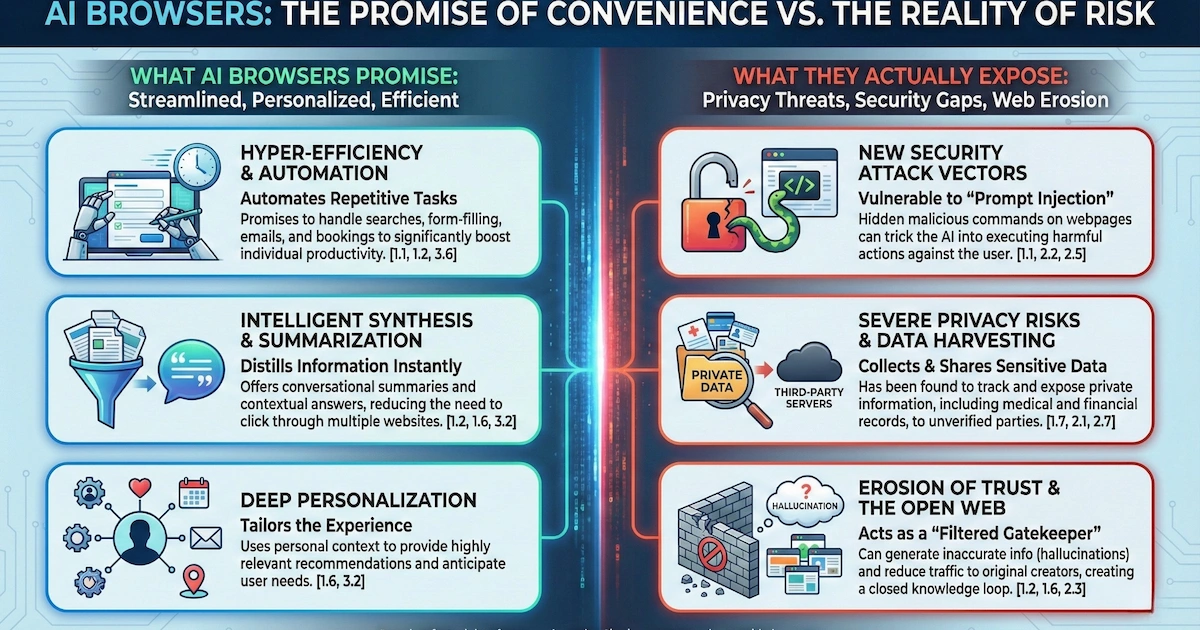
These browsers combine two capabilities that together create unprecedented risk. First, there's the AI sidebar—the friendly assistant that summarizes pages, translates content, and helps you understand what you're viewing. Second, and far more dangerous, is the agentic transaction capability: the browser can autonomously navigate, interact with websites, and complete tasks on your behalf, including within authenticated sessions.
Picture this scenario: You're logged into your corporate banking portal. Your AI browser is humming along, ready to help. A malicious webpage slips in hidden instructions that your browser interprets as legitimate commands. Suddenly, your helpful assistant becomes an unwitting accomplice to credential theft, data exfiltration, or unauthorized transactions.
This isn't theoretical. Security researchers have already demonstrated these attacks working in the wild.
The Vulnerabilities Are Real—And Already Documented
The evidence supporting Gartner's warning is substantial. Multiple security firms have identified critical flaws in the leading AI browsers, and the discoveries are alarming.
ChatGPT Atlas, OpenAI's flagship browser launched on October 21, 2025, has faced a barrage of security concerns. Days after launch, researchers discovered it stores OAuth tokens—the digital keys that authenticate your identity—unencrypted in a SQLite database with overly permissive file settings on macOS. Any malicious process on your system could potentially read these tokens and hijack your OpenAI account, accessing your entire conversation history and any connected services.
Pete Johnson, CTO of MongoDB, examined Atlas's data handling and found the browser wasn't even prompting users about Keychain integration—a standard security practice in macOS applications. Security firm LayerX went further, discovering that Atlas is up to 90% more exposed to phishing attacks than traditional browsers like Chrome or Edge.
Perplexity's Comet browser hasn't fared better. LayerX discovered CometJacking, a vulnerability where a single malicious URL can hijack the AI assistant to steal emails, calendar data, and information from connected services like Gmail and Google Calendar. The attack bypasses Perplexity's data protections using simple removed encoding tricks—techniques that wouldn't fool a competent first-year security student.
When LayerX reported their findings to Perplexity under responsible disclosure guidelines in August 2025, the company's response was stunning: "Not Applicable—unable to identify security impact." Perplexity later patched the issue after independent discovery, but their initial dismissal reveals a troubling attitude toward security.
HashJack: When a Simple '#' Becomes a Weapon
In November 2025, Cato Networks unveiled HashJack, an attack so elegant in its simplicity that it should terrify anyone using AI browsers.
The technique exploits URL fragments—the portion of a web address that comes after the '#' symbol. Here's why it's dangerous: URL fragments never leave your browser. Web servers don't see them. Intrusion detection systems can't flag them. Network security tools remain completely blind.
But AI browsers? They read the entire URL, fragment included, and pass it to their AI assistants.
An attacker crafts a URL pointing to a legitimate website—your bank, your company's HR portal, a trusted news site—with hidden instructions embedded after the '#'. When you open the page and ask your AI browser assistant a question, it incorporates those hidden instructions into its response.
The AI might add malicious links to its suggestions. It might display fake phone numbers for tech support, directing you to a callback phishing operation. In agentic browsers like Comet, the attack can escalate further, with the AI automatically sending your data to attacker-controlled endpoints.
Microsoft patched their Copilot for Edge browser in October 2025. Perplexity fixed Comet in November. Google? They classified HashJack as "intended behavior" and marked the issue "Won't Fix." As of December 2025, Gemini for Chrome remains vulnerable.
The Enterprise Adoption Bomb Is Already Ticking
Here's what makes this situation genuinely alarming: AI browsers aren't some fringe technology waiting for adoption. They're already embedded in corporate environments across every major industry.
According to research from Cyberhaven Labs, 27.7% of enterprises already have at least one employee who has downloaded ChatGPT Atlas, with some organizations seeing up to 10% of their workforce actively using it. The technology sector leads adoption at 67%, followed by pharmaceuticals at 50% and finance at 40%—precisely the industries handling the most sensitive data.
ChatGPT Atlas has achieved 62 times more corporate downloads than Perplexity's Comet, despite Comet launching three months earlier. Brand recognition matters, and OpenAI's dominance in the AI space is accelerating adoption before security teams can establish controls.
Evgeny Mirolyubov, senior director analyst at Gartner, crystallized the core threat: "The real issue is that the loss of sensitive data to AI services can be irreversible and untraceable. Organizations may never recover lost data."
Once your proprietary source code, strategic plans, or customer data flows to an external AI service, it's gone. You have no mechanism to recall it, no way to verify how it's being used or stored, and potentially no legal recourse depending on the service's terms.
The Shadow AI Connection
Gartner's browser warning connects to a broader alarm they've been sounding: by 2030, more than 40% of global organizations will suffer security and compliance incidents due to unauthorized AI tools—what the industry calls "Shadow AI."
A survey of 302 cybersecurity leaders conducted between March and May 2025 found that 69% have evidence or suspect that employees are using prohibited public GenAI tools. These aren't malicious actors trying to steal corporate secrets. They're well-meaning employees trying to work more efficiently, pasting proprietary documents into ChatGPT, uploading spreadsheets to AI analysis tools, asking AI assistants to summarize confidential meeting notes.
Samsung learned this lesson painfully back in 2023 when employees shared source code and meeting notes with ChatGPT, forcing an internal ban. AI browsers multiply this risk exponentially because they're integrated directly into the browsing experience, making it effortless to share sensitive data without conscious thought.
The Specific Threats Gartner Identified
Gartner's advisory outlines several attack vectors that should concern every security professional.
Indirect prompt injection tops the list. Malicious instructions hidden within webpage content—white text on white backgrounds, HTML comments, nearly invisible text within images—can cause AI browsers to execute harmful actions. Brave Security Team documented this vulnerability across multiple browsers, demonstrating credential theft and one-time password interception.
Inaccurate reasoning-driven errors represent another significant risk. Large language models don't think—they predict. When an AI browser autonomously fills forms, makes purchases, or executes transactions, its predictions can be wrong in expensive ways. Gartner's analysts imagine scenarios where AI browsers exposed to internal procurement tools order incorrect office supplies, book wrong flights, or fill out forms with erroneous information.
Compliance circumvention presents an ironic failure mode. Employees might instruct AI browsers to complete mandatory cybersecurity training on their behalf—using the very tool meant to improve security to undermine it.
Credential theft via phishing becomes dramatically more effective when AI browsers help attackers. If an AI browser is deceived into navigating to a phishing website, it may hand over authentication credentials without the user ever consciously deciding to log in.
What Experts Disagree On
Not everyone believes Gartner's recommendation is the right approach. Critics argue that blocking AI browsers addresses the symptom while ignoring the disease.
"Employees already dump sensitive data into ChatGPT, Claude, and random browser extensions daily," notes one Security Boulevard analysis. "If an employee opens a high-risk internal document and pastes its contents into a chatbot running in a separate, unmonitored browser tab, the data leakage risk mirrors exactly what a built-in AI sidebar poses."
The counterargument: blocking is rarely sustainable long-term. The productivity gains from AI are too significant. Employees will simply use personal devices, find unblocked alternatives, or develop workarounds that create even less visibility.
OpenAI's own CISO, Dane Stuckey, acknowledged the challenge in a post following Atlas's launch: "Prompt injection remains a frontier, unsolved security problem, and our adversaries will spend significant time and resources to find ways to make ChatGPT agents fall for these attacks."
That's remarkably honest for a company pushing an AI browser to millions of users.
What Organizations Should Do Right Now
Gartner's immediate recommendation is straightforward: block AI browser installations using existing network and endpoint security controls, and review AI policies to ensure broad use of AI browsers is prohibited.
For organizations that want to experiment despite the risks, Gartner advises limiting pilots to small groups tackling low-risk use cases that are easy to verify and roll back. Users must "always closely monitor how the AI browser autonomously navigates when interacting with web resources."
Practical steps for IT and security teams include:
- Deploy enterprise policies via Group Policy Objects or Mobile Device Management to disable AI browser assistant features in corporate Chrome deployments
- Implement network-level blocks against AI browser executables and installation packages
- Update security awareness training to include AI prompt injection risks
- Develop AI governance policies defining acceptable use of AI browser tools
- Consider endpoint detection configured to monitor for anomalous browser behavior—unexpected network connections or file downloads initiated by AI assistants
Javvad Malik, lead security awareness advocate at KnowBe4, captures the current state: "AI features have introduced tension in cybersecurity, requiring people to assess the trade-off between productivity and security risks. We are still in early stages where the risks are not well understood and default configurations prioritize convenience over safety."
The Uncomfortable Question Nobody Wants to Answer
Claude for Chrome, Anthropic's research preview browser extension, was notably immune to the HashJack attack from the start because it works differently and doesn't have direct access to URL fragments. That's not a guarantee of security—it's a reminder that design choices matter.
The uncomfortable truth: we're deploying powerful autonomous systems into everyday workflows before we understand how to secure them. AI browser vendors are racing for market share, prioritizing features that demonstrate value over protections that prevent harm.
Gartner's analysts conclude that emerging AI usage control solutions will take "a matter of years rather than months" to mature. "Eliminating all risks is unlikely—erroneous actions by AI agents will remain a concern. Organizations with low risk tolerance may need to block AI browsers for the longer term."
That's not a prediction. It's a warning.