![After 20 Years, Google Lets You Ditch That Embarrassing Gmail Address [2025]](https://techdodo.in/storage/articles/gmail_let_users_change_their_email_1766925131_6951234b88dd0_medium.webp)
Quick Answer: Google is gradually rolling out the ability to change your @gmail.com address without creating a new account. India gets it first. Your old email becomes an alias, all data stays intact, and you can sign in with either address. The catch: you can only do this 3 times total, with a 12-month wait between changes.
After 20 years, Google is finally letting you ditch that embarrassing Gmail address—and India is first in line.
Remember coolguy2007@gmail.com? Or that handle with your ex's name in it? For two decades, your only escape was creating a new account and manually migrating everything. Photos, Drive files, YouTube subscriptions, app purchases—all of it, abandoned.
Here's the thing: that's about to change.
What Google Actually Announced (And Why It's in Hindi First)
Google didn't do a press release. No blog post. No fanfare.
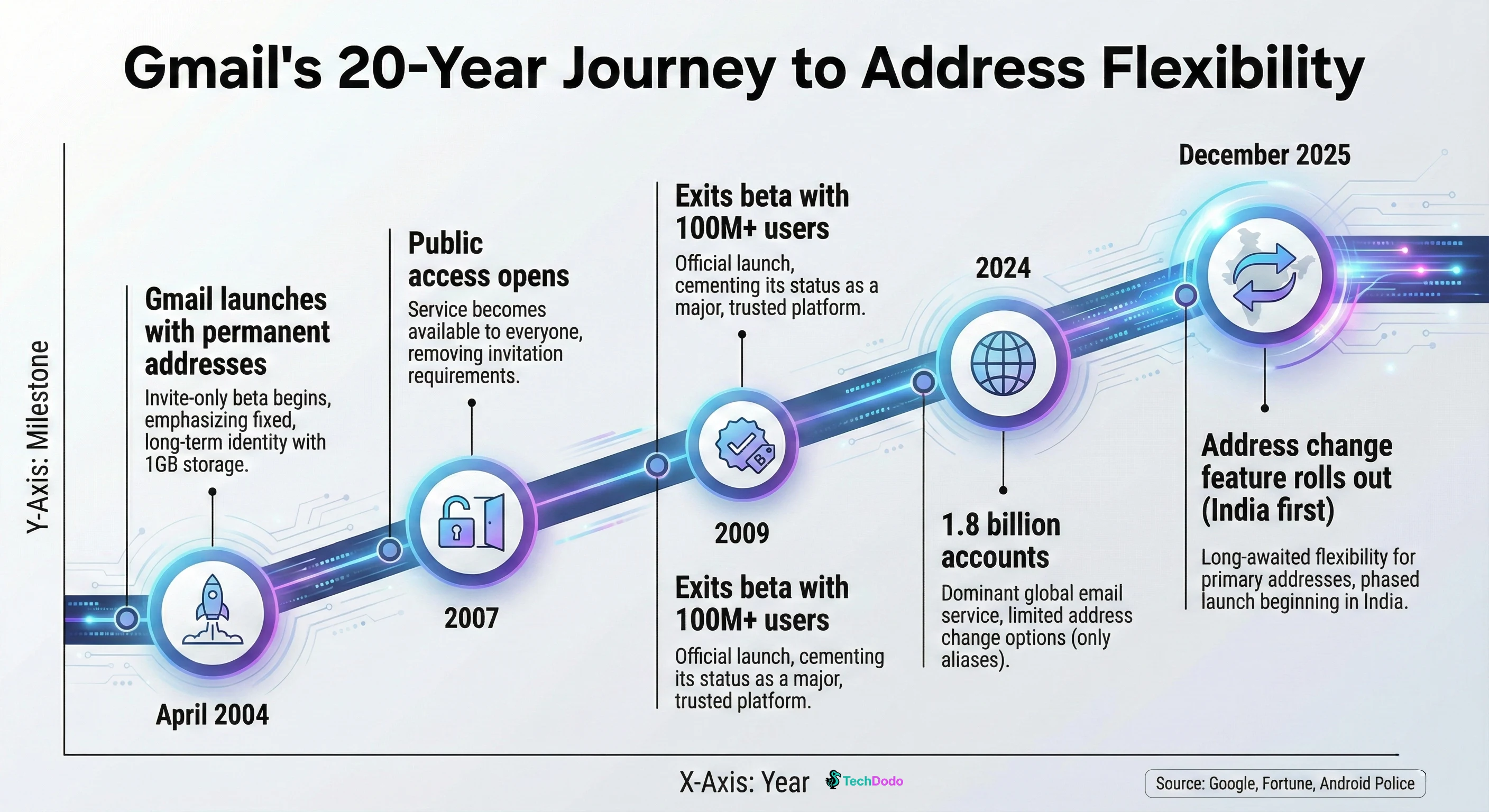
Instead, the company quietly updated its support documentation—in Hindi only. The Google Pixel Hub Telegram group spotted the changes on December 24, 2025, and the tech world collectively lost its mind.
The English support page still says @gmail.com addresses "usually cannot be changed." But the Hindi version? It lays out exactly how to swap your address while keeping your entire digital life intact.
This India-first approach isn't random. Google has a history of using regional markets to test major features before global rollout. With 1.8 billion Gmail accounts worldwide, even a small technical hiccup could affect millions. India gives them a controlled testing ground with a massive, tech-savvy user base.
How the Gmail Address Change Actually Works
The process itself is surprisingly straightforward—if you can access it.
Step 1: Check if You Have Access
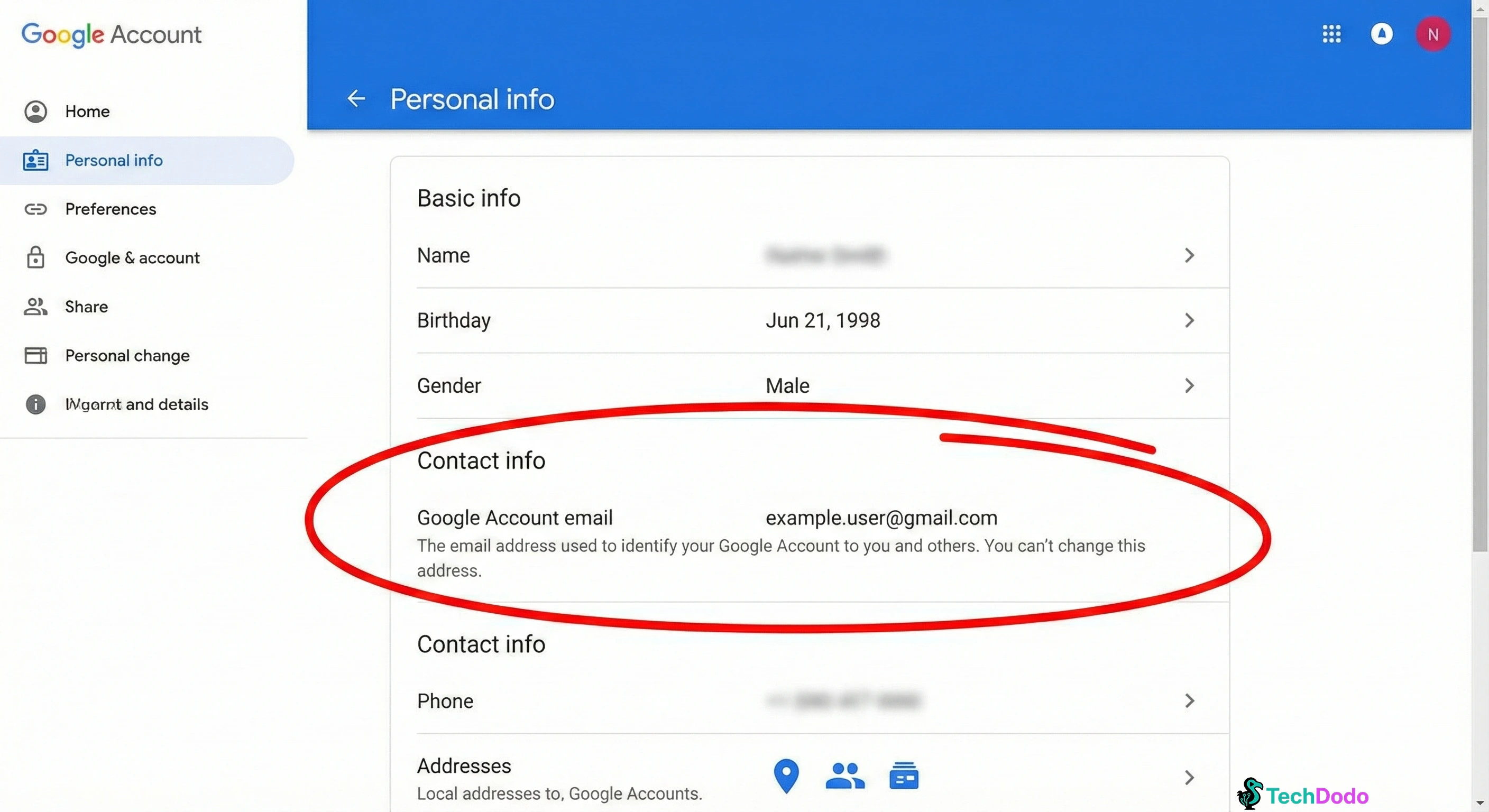
Navigate to myaccount.google.com/google-account-email on a desktop browser. Sign in to your Google Account.
Step 2: Find the Option
Click on "Personal information" in the left menu. Under "Contact info," select "Email," then "Google Account email."
Look for a button that says "Change your Google Account email address."
If it's not there, the feature hasn't rolled out to your account yet. No workaround exists—you'll need to wait.
Step 3: Enter Your New Address
Click the change button and type your desired new username. Google will check if it's available. You can even claim an address that was previously used by someone else and deleted.
Step 4: Confirm and Verify
Click "Yes, change email address" and complete the verification steps. Done.
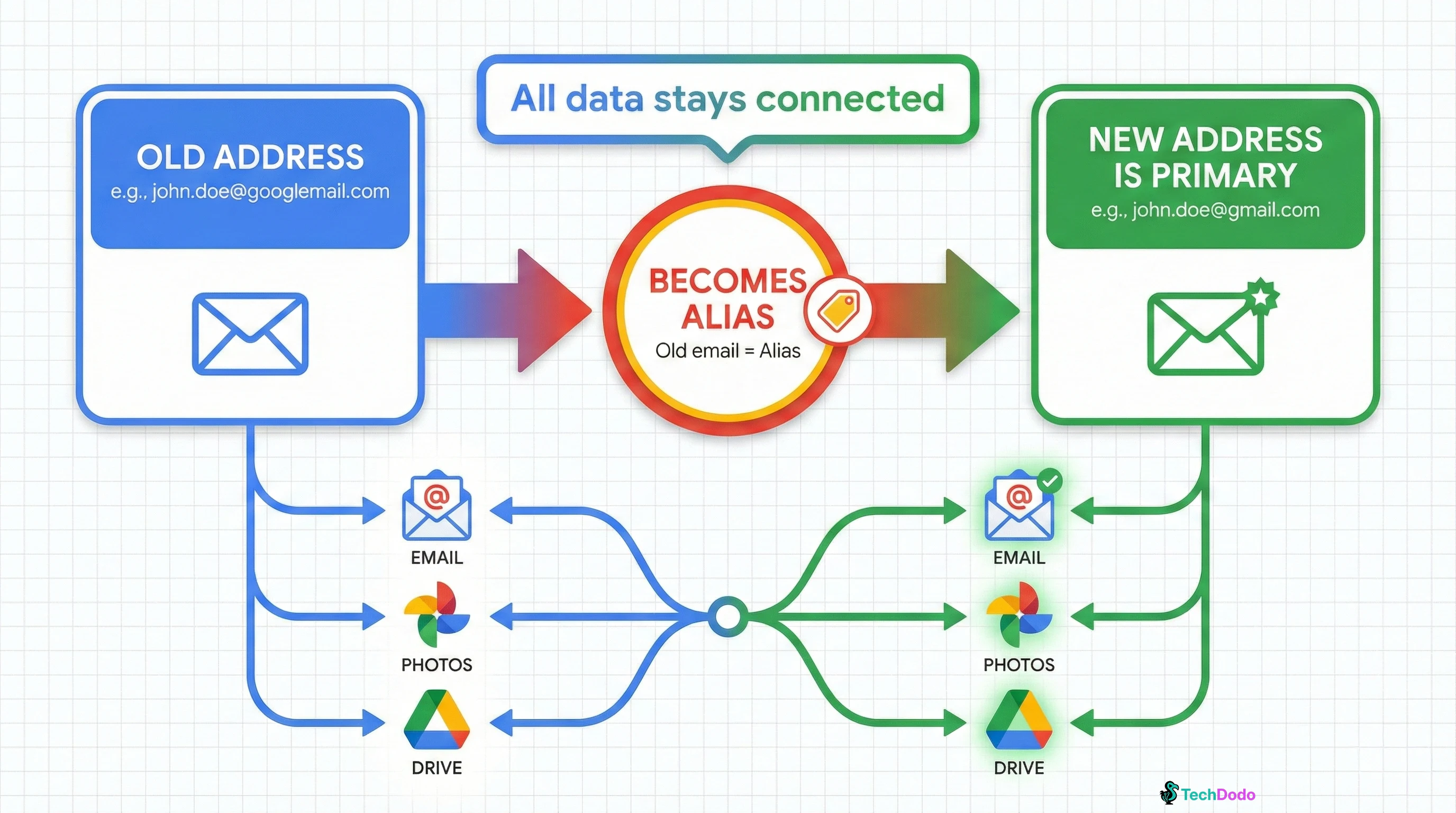
What Changes | What Stays the Same |
Your primary @gmail.com address | All emails, photos, Drive files |
Your login username (both old and new work) | YouTube subscriptions and history |
How your name appears to contacts | App purchases and Play Store data |
Calendar event creator attribution (eventually) | Google Pay and payment methods |
The Rules You Need to Know
Google isn't handing out unlimited identity changes. The guardrails are strict:
The 12-Month Lock: After changing your address, you cannot create another new @gmail.com address for a full year. Want to tweak it again because you made a typo? Tough luck—wait 12 months.
The 3-Change Limit: Your Google Account can only generate a new Gmail address three times total. Ever. This isn't annual—it's lifetime.
No Deletions: Once you've changed to a new address, you cannot delete it. Your old address can be reused as your primary at any time, but the new one sticks around forever.
Alias Permanence: Your old address automatically becomes an alias. Emails sent to both addresses land in the same inbox. You cannot stop receiving emails at your old address.
Limit | What It Means |
12-month cooldown | No new address for one year after changing |
3 changes maximum | Lifetime cap per Google Account |
No deletion | New address is permanent once created |
Alias mandatory | Old address receives email indefinitely |
What Happens to Your Connected Services?
This is where it gets interesting—and potentially messy.
Sign in with Google: If you've used "Sign in with Google" for third-party sites, you may lose access to those accounts. The sites authenticate based on your email address, and some don't handle changes gracefully. Google warns you might need to re-authenticate or update your linked account on each service.
Chromebook Users: Google specifically warns Chromebook owners to back up local files first. Removing and re-adding your Google Account with the new address may wipe your device's home directory. This is not a minor inconvenience.
Chrome Remote Desktop: Your remote connections will need reconfiguration after the switch. The authentication breaks, and you'll need to re-establish each connection manually.
Calendar Events: Older events you created will continue showing your old email address "for a while." Google's documentation is vague on how long "a while" actually means.
The Developer Angle: OAuth, Git, and API Implications
For developers, this change raises some genuine technical questions—many of which Google hasn't publicly addressed.
OAuth Tokens: When you change your password, Google revokes OAuth 2.0 tokens for Gmail-scoped applications. Whether an email address change triggers similar behavior is unclear. Developers should prepare for users to need re-authentication after address changes.
Git Commit Attribution: If you've committed code with your old Gmail address, that attribution doesn't magically update. Your commit history will show your old email unless you manually rewrite it (not recommended for shared repositories).
Service Accounts: Google's documentation doesn't mention service accounts or API access. If your applications authenticate using your Gmail address as an identifier, test thoroughly before changing.
"Sign in with Google" as a Developer: If you've built apps that use Google OAuth, users who change their Gmail addresses may appear as new accounts. Google uses an immutable sub (subject) identifier in OAuth tokens, which should persist—but the email claim will change. Apps that rely solely on email for user identification may break.
The Security Reality: Phishing Will Explode
Here's what nobody's talking about enough: this feature is a phishing goldmine.
The rollout is happening quietly, through support documentation rather than official announcements. Users are confused about whether the feature exists, how to access it, and what's legitimate.
Expect a surge in emails claiming "Your Gmail address needs to be updated" or "Confirm your new email address." These will lead to credential-harvesting pages that look exactly like Google's login.
How to Stay Safe:
- Google will never email you asking to click a link to change your address
- The option only appears in your Google Account settings at
myaccount.google.com - Never enter your password on a page you reached through an email link
- If someone calls claiming to be "Google Support" asking about email changes, hang up immediately
When Will Everyone Get Access?
Google says the feature is "gradually rolling out to all users." That's corporate speak for "we don't know, and we're not telling."
Based on the India-first Hindi documentation, global availability could take months. Google typically uses regional testing to identify edge cases, refine the experience, and scale infrastructure before worldwide deployment.
If you desperately need to check whether you have access, the only reliable method is visiting myaccount.google.com/google-account-email and looking for the change option. No third-party tool or workaround exists.
Why This Took Google 20 Years
Gmail launched on April 1, 2004—April Fools' Day. Many people thought the 1GB storage offer was a prank. It wasn't, and Gmail went on to capture 1.8 billion users.
But that 2004 architecture decision to make email addresses permanent? That became technical debt.
Your Gmail address isn't just email. It's your YouTube identity, your Android device key, your Chrome sync anchor, your Google Pay credential, and your login for hundreds of third-party services. Allowing changes means untangling two decades of identity infrastructure built on the assumption that addresses never change.
Competitors like Outlook and ProtonMail have offered aliases and address changes for years. Google's delay wasn't technical inability—it was risk management. With billions of accounts, even a 0.01% failure rate affects hundreds of thousands of users.
The India-first rollout suggests Google is finally confident enough to test this at scale—but cautious enough to do it region by region.
Common Questions About Gmail Address Changes
Can I change my Gmail address without losing data?
Yes. Google's new feature lets you swap your @gmail.com address while keeping all emails, photos, Drive files, YouTube subscriptions, and app purchases intact. Your old address becomes an alias automatically.
Is the Gmail address change available in India?
India appears to be first in line. The support documentation appeared in Hindi before any other language, and Google typically tests major features in regional markets before global rollout. Check myaccount.google.com/google-account-email to see if you have access.
How many times can I change my Gmail address?
Three times total, ever. After each change, you must wait 12 months before creating another new address. These limits are per-account and lifetime—not annual.
What happens to emails sent to my old address?
They still arrive in your inbox. Your old address becomes an alias that receives emails indefinitely. You cannot disable this—both addresses remain active.
Will changing my Gmail affect my YouTube or Google Photos?
No. All your data across Google services stays connected to your account. Only your primary email address changes—your content, subscriptions, and purchase history remain intact.
The Bottom Line
After 20 years, Google is finally acknowledging that people's identities evolve—and their email addresses should too.
For Indian users, this is a chance to be first. For everyone else, it's a reminder that big tech moves slowly on fundamental changes, and patience is required.
If you do get access, think carefully before making the switch. Three lifetime changes, a 12-month lock between each, and the potential for third-party service disruptions mean this isn't a decision to make impulsively.
We'll update this guide as the global rollout progresses and more details emerge. For now, check your settings periodically—and whatever you do, don't click any email links claiming to help you "update" your address.