![₹35,000 Laptop Trap: Microsoft's 16GB Requirement Kills Budget AI Features [2026]](https://techdodo.in/storage/articles/8gb-vs-16gb-laptop-india-copilot-pc-ram_1767342795_695782cb680d1_medium.webp)
That ₹35,000 laptop deal looks irresistible. Core i3 processor, 8GB RAM, 512GB SSD—perfect for college, right?
Here's the uncomfortable truth: Microsoft just drew a line in the silicon. And your budget laptop is on the wrong side of it.
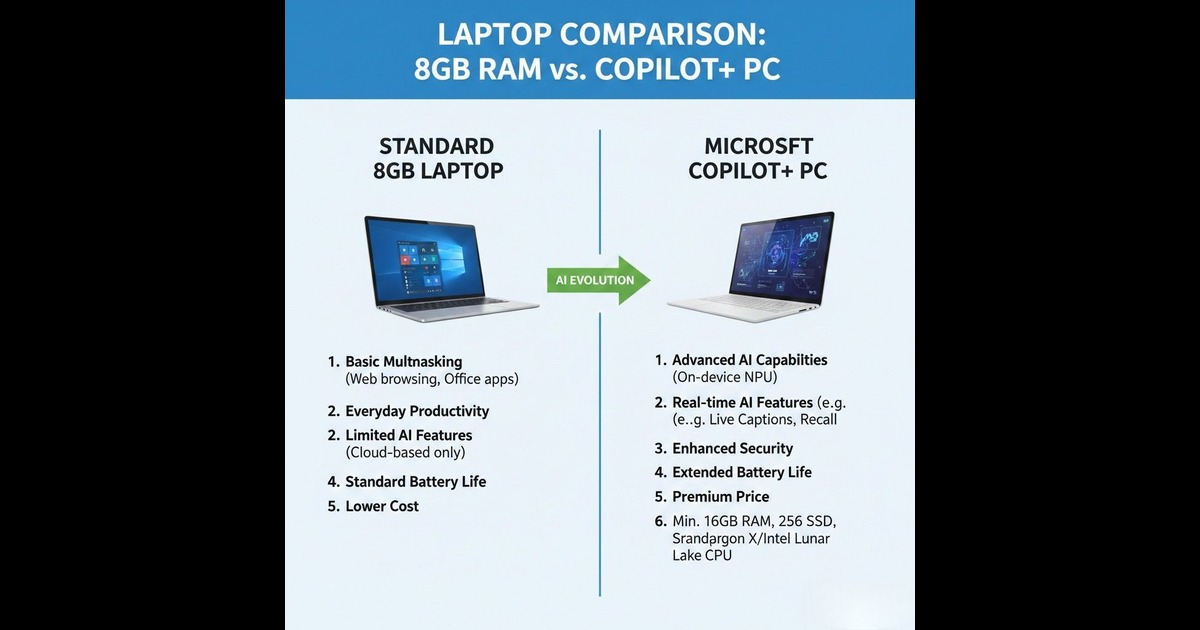
Quick Answer: Microsoft's Copilot+ PCs require 16GB RAM minimum + a 40 TOPS NPU chip for Windows AI features. Budget 8GB laptops under ₹35,000 won't run Recall, Live Captions, or Cocreator—ever. True AI PCs start at ₹80,000+ in India. Your 8GB machine works fine for basics but misses the AI wave entirely.
What Microsoft Actually Demands for AI Features
The confusion starts here. Microsoft hasn't raised Windows 11's minimum requirements. Your 8GB laptop still installs and runs Windows 11 perfectly fine.
But here's the catch.
Copilot+ PC—Microsoft's badge for AI-ready laptops—requires three things your budget machine doesn't have:
Requirement | Your ₹35k Laptop | Copilot+ PC Minimum |
RAM | 8GB DDR4 | 16GB DDR5/LPDDR5 |
Storage | 256-512GB SSD | 256GB SSD ✅ |
NPU | ❌ None | 40+ TOPS required |
Processor | Intel i3/AMD Ryzen 3 | Snapdragon X / Intel Core Ultra 200V / AMD Ryzen AI 300 |
That last row is the killer. Even if you upgraded to 16GB RAM, your laptop still lacks the Neural Processing Unit (NPU) needed to run on-device AI.
The "AI Tax" Explained: Why This Matters for Indian Buyers
Microsoft's compatible processor list reads like a premium shopping catalog: Snapdragon X Elite, Intel Core Ultra 200V series, AMD Ryzen AI 300 series. These aren't chips you find in sub-₹50,000 laptops.
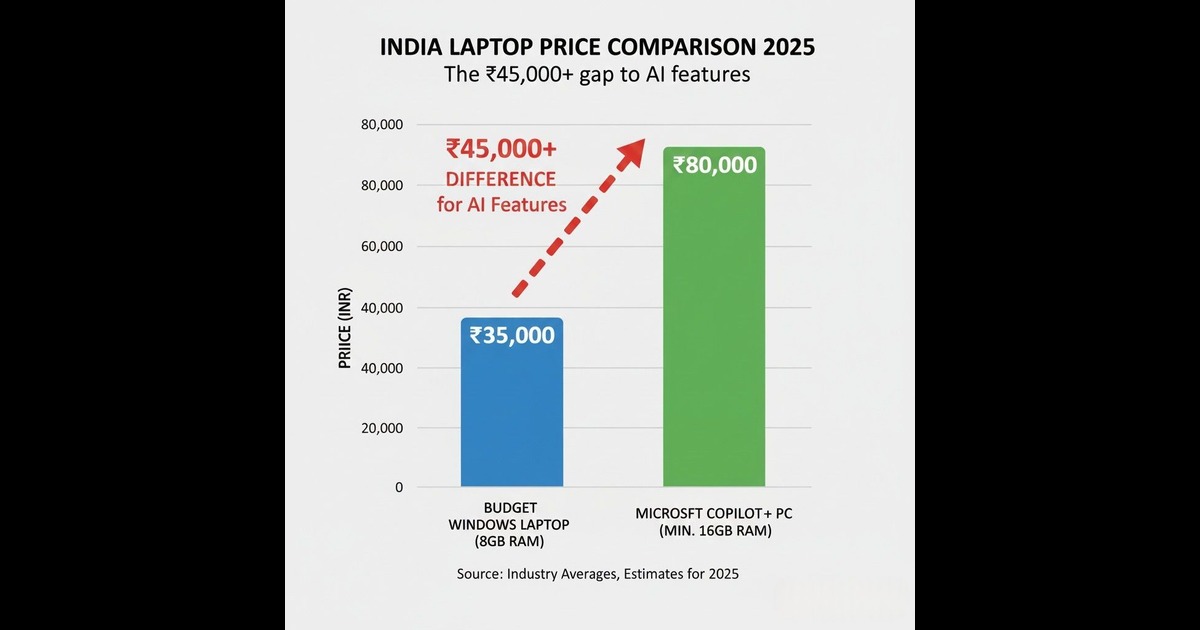
Current Copilot+ PC pricing in India tells the real story:
- Microsoft Surface Pro/Laptop (Copilot+): Starting ₹1,13,900
- Entry Copilot+ laptops (HP, Lenovo, ASUS): ₹80,000-95,000
- Budget 16GB laptops (without NPU): ₹37,000-50,000
- Budget 8GB laptops: ₹25,000-35,000
The price gap between "runs Windows" and "runs Windows AI" is ₹45,000-80,000. That's not a marginal upgrade—it's a different product category entirely.
What Features You're Actually Missing
Let's be specific about what 8GB laptop owners won't get:
Recall – Windows' photographic memory feature that lets you search everything you've seen on your PC. Needs NPU + 16GB RAM.
Live Captions with Translation – Real-time translation of any audio into English from 40+ languages. Runs locally on NPU.
Cocreator in Paint – AI image generation using text prompts. Requires Copilot+ hardware.
Windows Studio Effects – AI-powered video call enhancements like automatic framing and background blur. NPU-dependent.
Click to Do – Context-aware quick actions on any text or image. Rolling out to Copilot+ PCs through 2025.
Sound familiar? These features echo what Apple Intelligence offers on iPhones—except Apple supports devices back to 2020's M1 chip. Microsoft's cutoff is far more recent.
The Windows 12 Question Nobody's Answering
Here's where things get murkier. Multiple industry reports suggest Windows 12 (or whatever Microsoft calls it) will push 16GB RAM as the comfortable minimum—not just for AI features, but for smooth general use.
The pattern is clear: Windows 10 needed 1-2GB RAM. Windows 11 needs 4GB officially but runs poorly below 8GB. The next version? Analysts expect 8GB minimum, 16GB recommended.
Microsoft hasn't confirmed this. But they haven't denied it either. And their aggressive Copilot+ push strongly hints at where the baseline is heading.
The Real Question: Should You Still Buy an 8GB Laptop?
Not so fast. Before you panic-buy a ₹80,000 Copilot+ PC, consider what you actually need.
8GB is genuinely fine if you:
- Primarily browse the web, watch videos, use Office
- Won't keep this laptop beyond 2-3 years
- Don't care about AI features (honestly, many people won't)
- Need to stay under ₹35,000 absolutely
Spend more for 16GB (minimum ₹37,000-45,000) if you:
- Plan to keep the laptop 4+ years
- Run multiple applications simultaneously
- Want headroom for future Windows updates
- Do light creative work (Photoshop, Premiere)
Only consider Copilot+ (₹80,000+) if you:
- Specifically want Windows AI features
- Do professional creative work
- Want longest possible device lifespan
- Budget genuinely allows it
The Smart Budget Move for Indian Students
Here's the counterintuitive advice: the ₹35,000 8GB laptop isn't automatically a bad purchase. It's a bad long-term purchase.
If you're buying a laptop for 2-3 years of college and will replace it after, an 8GB machine does the job. Just don't expect AI features.
But if you're stretching to make this purchase last 5+ years? That extra ₹5,000-10,000 for 16GB RAM today saves you from feeling left behind when AI features become standard in every app, every workflow, every classroom demo.
The real trap isn't the 8GB laptop itself. It's buying it while expecting it to keep up with AI trends. It won't. And now you know.
What Experts Disagree On
Industry observers remain split on timing. Some believe Microsoft will backport certain AI features to lower-spec machines (with cloud processing). Others argue the 40 TOPS NPU requirement exists precisely because Microsoft wants on-device processing for privacy and speed.
What's not disputed: the hardware requirements are real, published, and unlikely to soften. Microsoft's documentation explicitly lists compatible processors—and your budget chip isn't on the list.
The Bottom Line
Microsoft's Copilot+ standard creates a two-tier Windows experience. AI features require premium hardware. Budget laptops get basic Windows. That's the reality for 2025-2026.
For Indian buyers, the decision framework is simple: match your purchase to your actual needs and timeline. Don't buy an 8GB laptop expecting AI features. Don't buy a Copilot+ PC if you just need Google Docs.
The ₹35,000 deal remains a deal—if you know exactly what you're getting. And now you do.
We'll update this guide when Microsoft announces Windows 12 requirements or changes Copilot+ PC specifications.