
15 Free AI Tools That Will Transform Your Work in 2026
Let’s be honest for a second. The "AI Revolution" has mostly felt like a subscription fatigue revolution.
You sign up for a "free" trial, generate three weird images of a cat in a spacesuit, and then—bam—paywall. By the time you actually need the tool for work, you’re staring at a ₹2,000/month debit on your card statement.
But as we barrel toward 2026, the landscape is shifting. The hype merchants are dying out, and the utility kings are taking over. The best tools right now aren't just flashing cool demos; they are giving away incredible value for free to capture the market.
I’ve tested over 200 tools this year. I’ve ignored the wrappers and the scams. These are the 15 free AI tools that are actually worth your time, your bandwidth, and (not) your money.
The "Second Brains" (Research & Writing)
These aren't just chatbots; they are synthesis engines.
1. Google NotebookLM
The Student & Analyst Savior
If you haven't used NotebookLM yet, you are working too hard. While everyone was distracted by Gemini’s rocky start, Google quietly dropped this absolute nuke of a productivity tool.
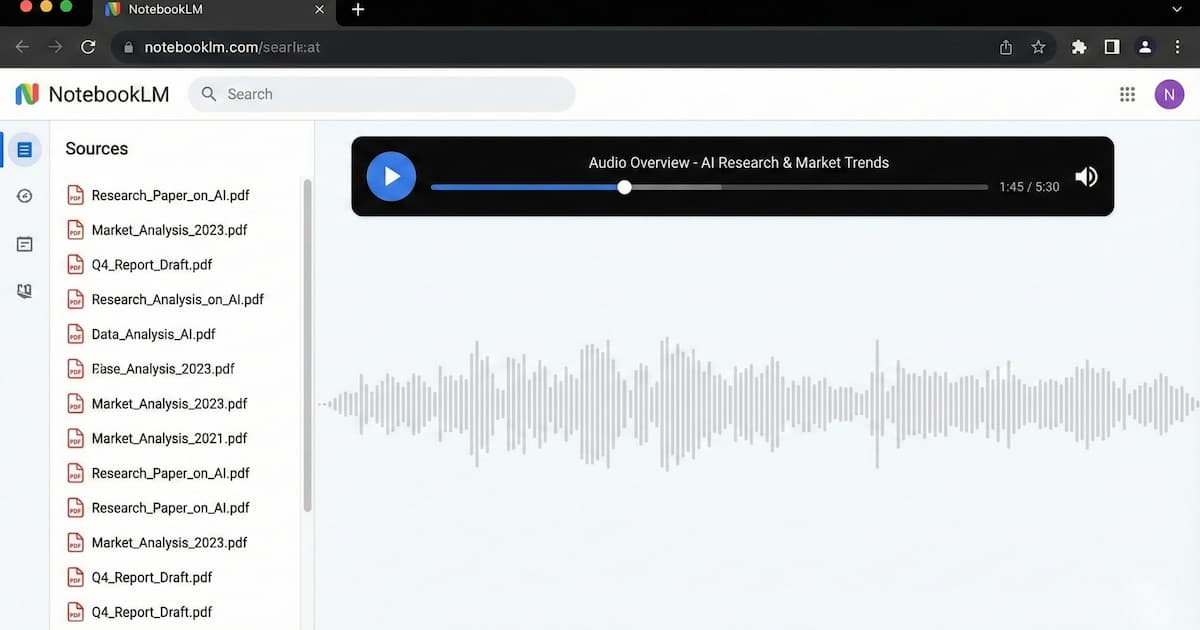
What it does: You upload your PDFs, Google Docs, or paste website URLs, and it becomes an expert on only that data. No hallucinations from the wild web.
The "So What?": The killer feature is the "Audio Overview." It turns your boring 50-page compliance report or history thesis into an engaging, two-person podcast. You can literally listen to your homework or meeting notes while stuck in traffic on the Silk Board junction.
- Free Tier Specs: Completely free (as of Dec 2025). Up to 50 sources per notebook.
- India Context: Essential for UPSC aspirants and students who need to digest massive amounts of syllabus material quickly.
2. Perplexity AI
The "Google Search" Killer
I stopped Googling things in mid-2024. I "Perplexity" them.
What it does: It’s a search engine that gives you answers, not links. It browses the internet in real-time and cites its sources.
The "So What?": The "Pro Search" (limited usage on free tier) breaks down complex questions into sub-steps. If you ask, "Compare the Pixel 9 and iPhone 16 pricing in India including bank offers," it actually hunts down the specific HDFC or ICICI discounts rather than just giving you the US dollar launch price.
- Free Tier Specs: Unlimited "Quick" searches; limited "Pro" searches (resets every 4 hours).
- Risk: Always click the citations. It’s accurate 95% of the time, but that 5% can bite you.
3. SciSpace (Typeset.io)
The Academic Weapon
What it does: It’s like ChatGPT but specifically trained on over 200 million research papers.
The "So What?": You can highlight confusing text in a scientific paper, and it explains it in plain English. It also generates a "Copilot" table that compares results across multiple papers instantly.
- Free Tier Specs: Generous daily limits on searches and PDF analysis.
The "Builders" (Coding & Web)
If you are a developer in India and you aren't using these, you are coding with one hand tied behind your back.
4. Cursor
The VS Code Successor
This is the tool that is making every senior engineer I know question their career choices (in a good way).
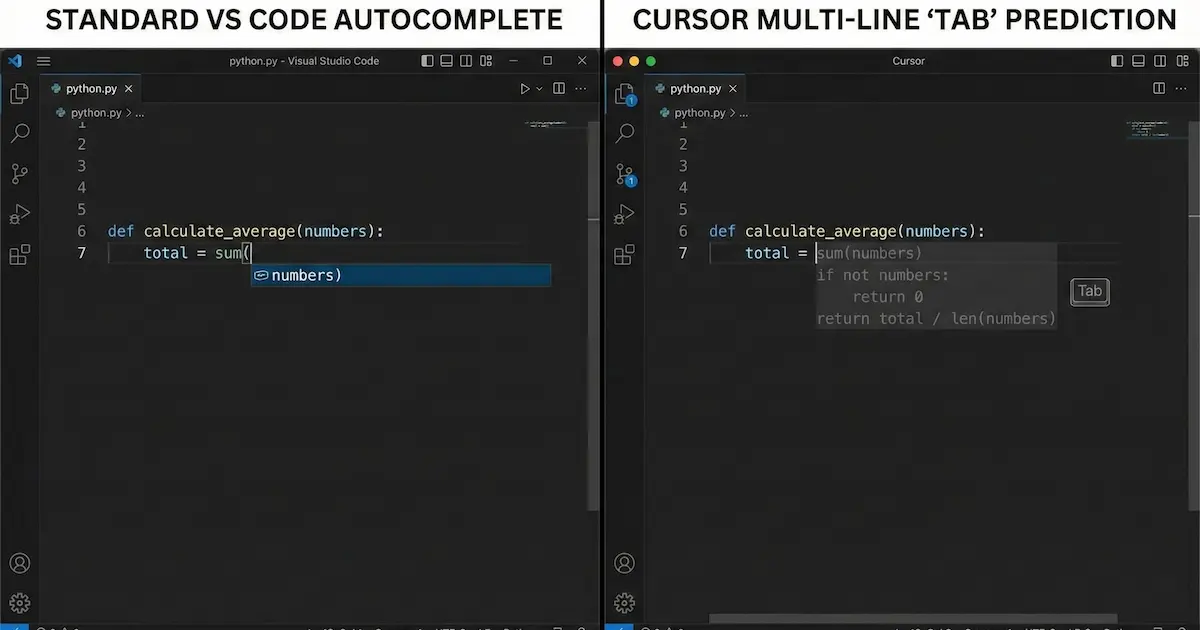
What it does: It’s a fork of VS Code, so all your extensions work. But it has AI baked into the core, not just as a sidebar plugin.
The "So What?": Features like "Tab" (which predicts your next ten edits, not just the next word) and "Composer" (which can write entire apps across multiple files) are unmatched.
- Free Tier Specs: 2000 "completions" per month and limited "slow" queries to premium models like Claude 3.5 Sonnet. Perfect for hobbyists or students.
- Pro Tip: Use the free tier to build your portfolio. It’s enough to ship a full project.
5. v0.dev (by Vercel)
The Frontend Magician
What it does: Text-to-UI. You describe a website component (e.g., "A dark-mode dashboard for a fintech app with specific charts"), and it writes the React/Tailwind code for you.
The "So What?": It doesn't just give you a picture; it gives you clean, copy-pasteable code. For freelance web developers, this cuts generic UI work from hours to seconds.
- Free Tier Specs: Daily credit allowance that resets. Sufficient for 5-10 generations a day.
6. Hugging Face Chat
The Open Source Playground
What it does: It gives you free access to the powerful open-source models that usually require expensive GPUs to run—like Llama 3, Mistral, and Flux (for images).
The "So What?": If you want to test the latest models without paying a subscription to OpenAI or Anthropic, this is your hub. It is privacy-focused and doesn't train on your chats by default.
The "Creative Studio" (Design, Video, Audio)
7. Napkin.ai
The "Boring Doc" Fixer
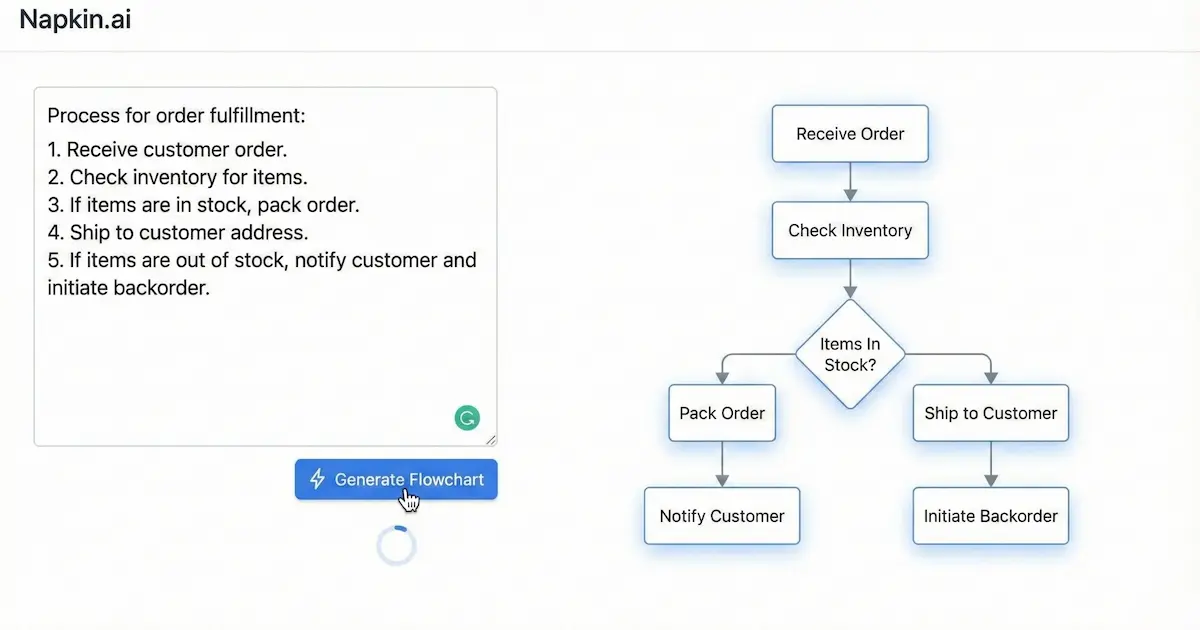
What it does: It takes your boring text and instantly turns it into professional visuals, charts, and diagrams.
The "So What?": You know those cool diagrams in tech newsletters? This tool makes those. You paste a paragraph about "Distributed Systems," and it auto-generates a clean line-art diagram explaining it.
- Free Tier Specs: Currently in Beta (free) with generous export limits.
8. Recraft
The Vector King
Midjourney is great for art, but terrible for logos and icons. Recraft is the answer.
What it does: It generates vector art (SVGs) that you can actually edit and scale infinitely.
The "So What?": You can generate a logo, and then tell the AI, "Make this line thicker" or "Change the palette to Brand Blue," and it actually listens.
- Free Tier Specs: 30 credits per day (approx. 15 images). Images are public in the community gallery on the free plan.
9. Kling AI
The Video Wildcard
Sora isn't public. Kling is. And it’s shockingly good.
What it does: Text-to-video generation that creates realistic motion (hair blowing in wind, reflections, etc.).
The "So What?": It’s currently the closest free alternative to high-end cinema AI. You can create 5-second clips that look professionally shot.
- Free Tier Specs: Daily free credits (usually ~66 credits), but videos come with a watermark.
- India Availability: Accessible directly without VPN (as of Dec 2025).
10. Suno
The Music Factory
What it does: Text-to-song. Full lyrics, vocals, and instrumentation.
The "So What?": Need a royalty-free lo-fi track for your YouTube intro? Or a ridiculous Bollywood-style song about your friend's birthday? Suno does it in 30 seconds.
- Free Tier Specs: 50 credits/day (10 songs). You cannot monetize the songs on the free plan (non-commercial use only).
The "Essentials" (Daily Drivers)
You know them, but are you using the free versions right?
11. Claude (Anthropic)
Why: The free tier now gives you access to Sonnet 3.5 (with limits). For coding and nuanced writing, it is significantly "smarter" and less robotic than the free version of ChatGPT.
12. ChatGPT (OpenAI)
Why: With GPT-4o mini now free, it’s the fastest, most reliable multi-modal tool. Use it for vision (uploading a photo of your fridge to get recipes) and quick translations.
13. Microsoft Designer
Why: It gives you free access to DALL-E 3 for image generation without the ChatGPT Plus subscription. Just log in with a Microsoft account.
14. Gamma
Why: It generates entire slide decks from a prompt. "Make a pitch deck for a chai startup in Bangalore." It builds the slides, the text, and the images.
- Free Tier: 400 credits at sign-up.
15. Otter.ai
Why: It joins your Zoom/Google Meet calls and transcribes them. The free plan offers 300 minutes of transcription per month.
- The "So What?": Never take meeting notes again.
Comparison: The "Must-Haves" vs. The "Nice-to-Haves"
Category | Must-Have (Install Now) | Nice-to-Have (Use Occasionally) |
Coding | Cursor | v0.dev |
Writing | NotebookLM | Claude |
Visuals | Napkin.ai | Recraft |
Search | Perplexity | ChatGPT |
Risks & Unknowns (Read This)
- The "Free" Trap: "Free" in AI usually means "We are training on your data." If you are working on sensitive proprietary code or confidential legal documents, do not use the free tiers of online LLMs. Run local models (using tools like LM Studio) or pay for the privacy-focused enterprise tiers.
- The Watermark: Tools like Kling and Suno embed invisible or visible watermarks. Don't try to pass AI work off as human-made in commercial projects; the metadata will catch you.
- Availability: These tools change pricing models fast. What is free in Dec 2025 might be paid by March 2026.
Conclusion
2026 isn't about who has the most powerful AI; it's about who has the best workflow.
You don't need to subscribe to all of these. If you're a writer, grab NotebookLM and Claude. If you're a dev, live inside Cursor. If you're a creator, master Recraft and Kling.
The goal is to let the AI handle the grunt work—the transcribing, the vectorizing, the boilerplate coding—so you can focus on the actual creative thinking.
What to do next: Pick one tool from this list that solves a problem you actually hate doing (e.g., meeting notes -> Otter, coding syntax -> Cursor). Create a free account today and use it for one real task this week. Don't just play with it; put it to work.